Design "Store" Feature for E-commerce Site
Design a Store feature for an e-commerce site to reduce user purchase journey by 40%.
Intro
ASUS has launched a new site in 2021 to develop an e-commerce service rather than selling products only from physical stores. Yet the purchase journey isn't easy to complete which affects the online order experience. The "Store" function could make it simple enough for users to reach all e-commerce services and products in fewer steps. The final proposal has successfully satisfied stakeholders' expectation and is now online in ASUS website.
Methods: Survey analysis, Competitive analysis, Wireframe design
My role: Lead UX designer and researcher
Team: 2 UX designers, 2 UI designers, 1 UX manager, 1 Product manager, 2 engineers
Duration: 2 months, 2021
Pain points: Current purchase journey requires too many steps
The current design of purchase journey is actually for users who would like to browse more products or look up detailed product description. Yet It requires too many steps to reach the purchase button by firstly choosing product types, series and then in stock, which might discourage users who intend to order directly.
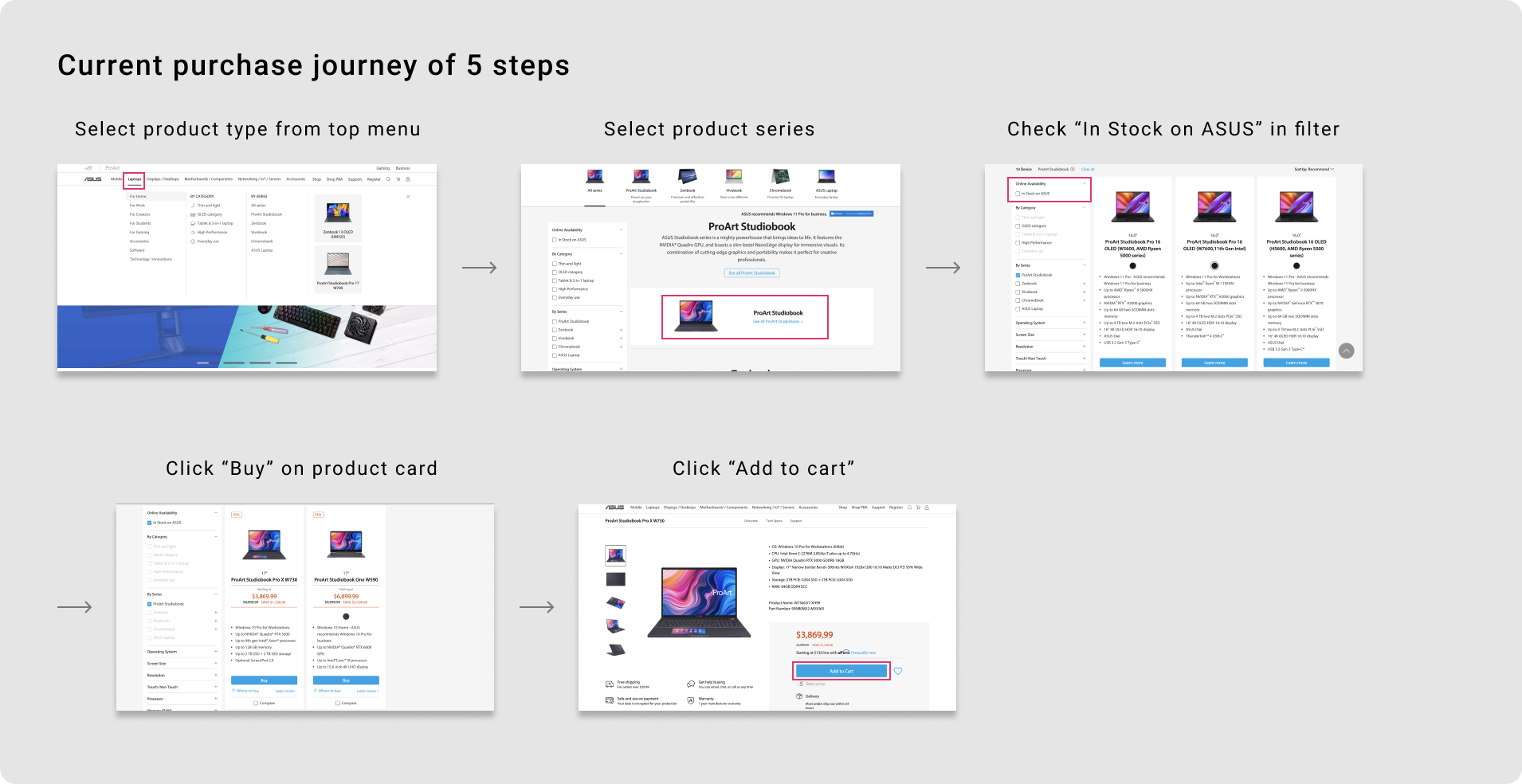
Stakeholders proposed to provide a "Store" function on site
Therefore, stakeholders proposed the request of providing "Store" function as Apple and HP does on homepage to shorten the purchase journey. Targeting the customer types who need to order efficiently, we have two business goals set:
1. To gather e-commerce related services together, make them easy to reach
2. To increase the visibility rate of products, motivate users to purchase more products
I designed the wireframe from 0 to 1, and presented to 100+ stakeholders
As the main researcher and designer in this project, I conducted online survey to understand the needs of users. Next, I studied Apple and HP site to figure out how they design in their present site as a reference. Based on the findings, we proposed our design idea and wireframes to discuss with stakeholders from all over the world and collect their feedbacks for iteration.

Solution follow-up: Store is now online! 🔥
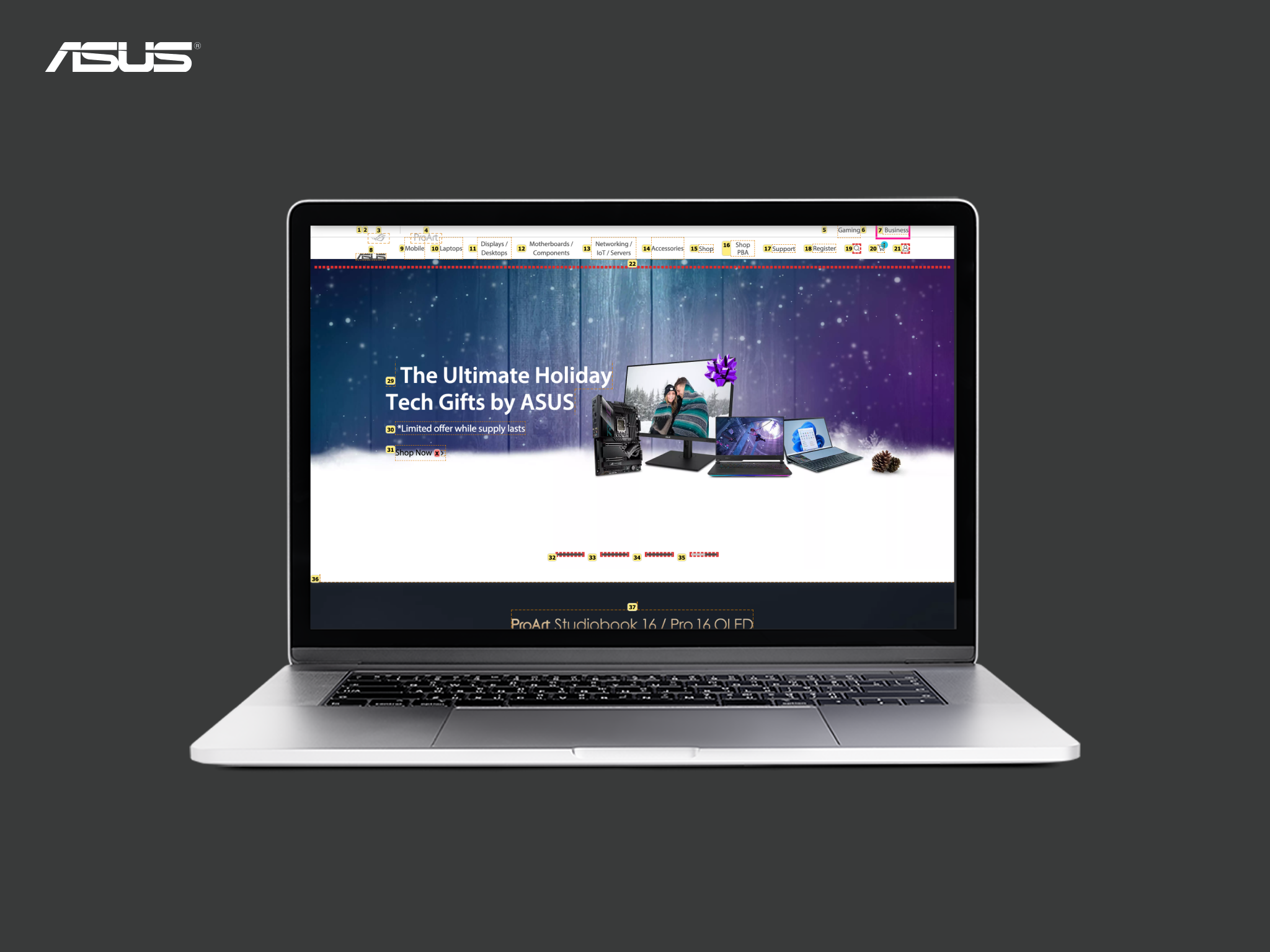
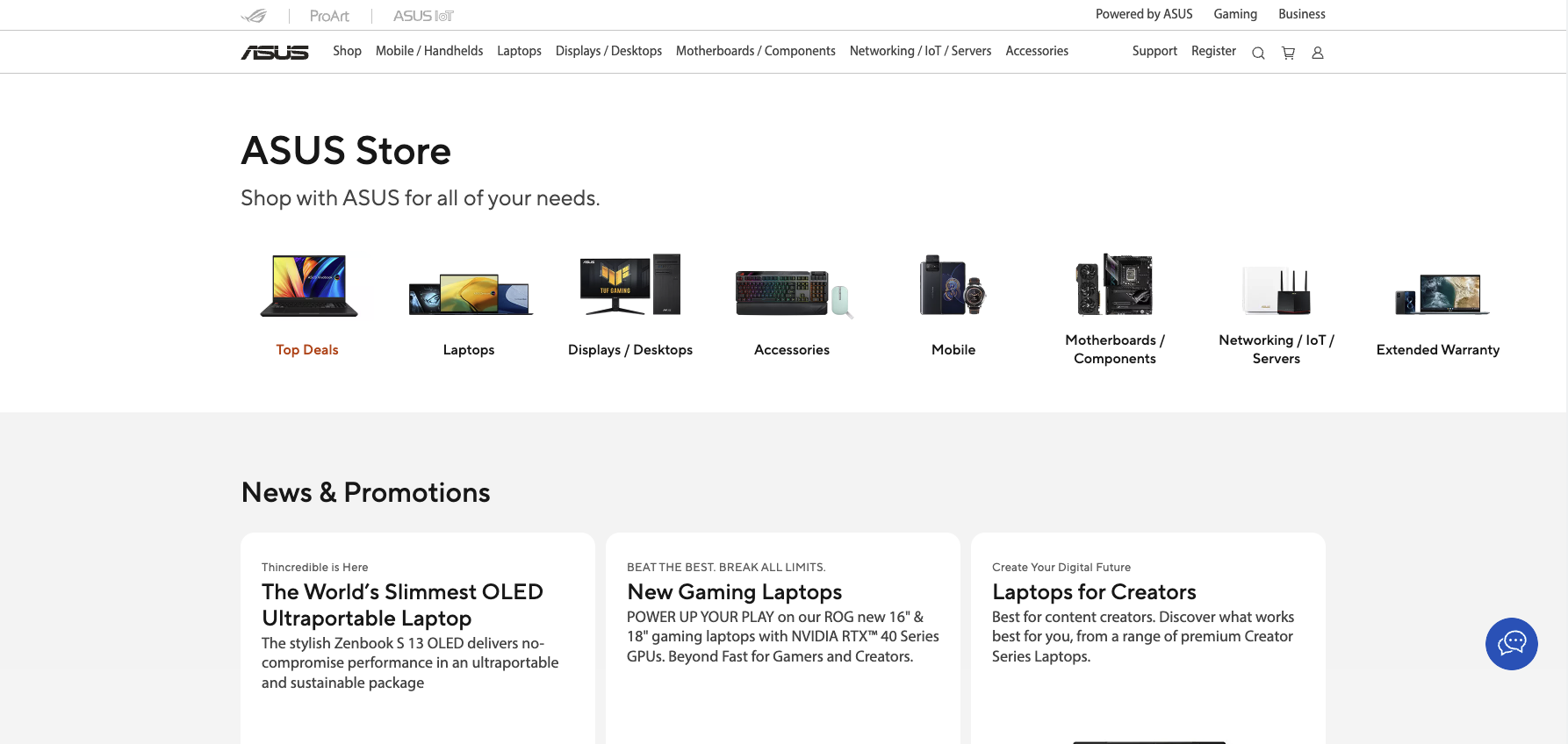
After a few months I left the company, Store feature is now online on ASUS official website! The entrance button is renamed to 'Shop' but the overall content is similar as what has been designed. The page includes four main sections, which are respectively Product Categories, News and Promotions, Highlighted Products, Benefits to Shop, and Featured Accessories.
View the full page in ASUS website
👉 Continue to read the detailed design process!
01 Research
Gain basic understanding of users from online survey
We released a quick online survey button on site to collect end-users' behavior and feedbacks of consumer site from different countries. Questions include three sections: Overall satisfaction, Purpose of visiting and Net Promoter Score. View more from survey.
- Reporting period: 2021/01/29 – 2021/03/14
- Total responses: N=905
Results show it's difficult for users to look for the right product to purchase
1. Satisfaction score is only 2.71 out of 5 in average. NPS score is only -38 out of 100 in average, Sweden has the lowest score.
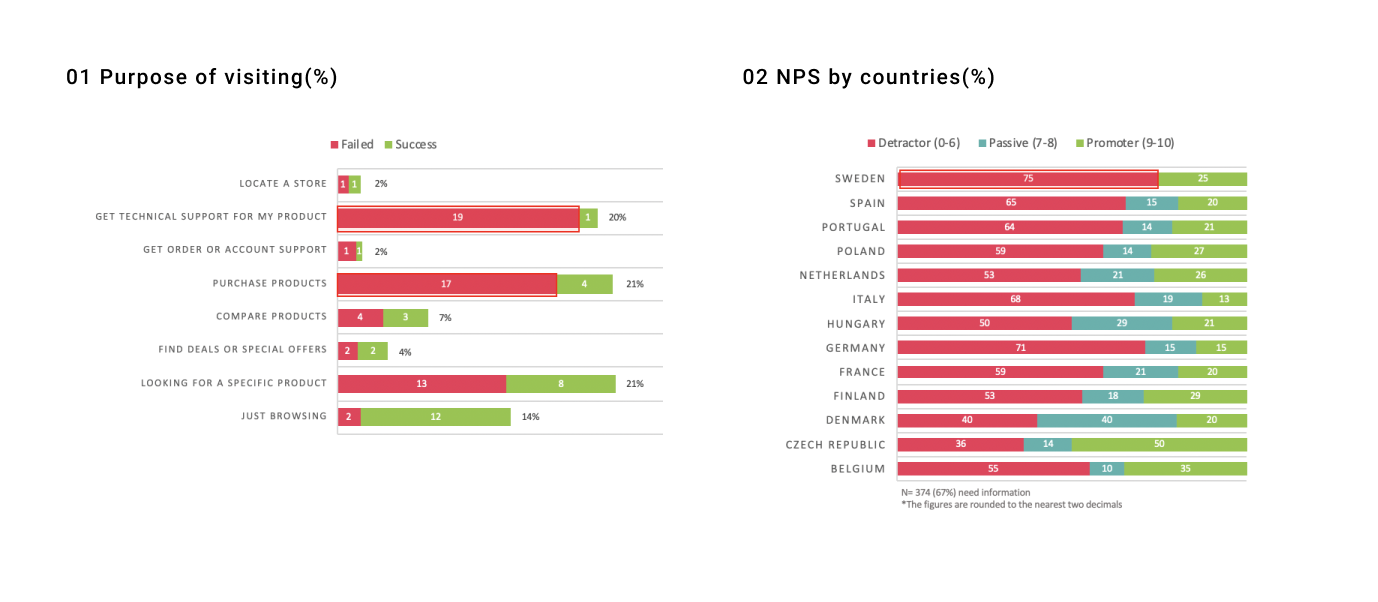
2. Most users come to the site for product purchase and get technical support. However, for the former purpose, they're often failed in order products due to not finding the specific product easily, unable to order or no price info.
“The website is designed beautifully, it's just not that easy to buy a product and pay for it right away.” - user from Germany
“It is very unintuitive with so many menus and the information is not clearly displayed, either to buy or to know what the latest products are.” -user from Spain
To sum up, the content, design, and the experience in deed impact users on making purchase decision in practice. Therefore, a complete and user-friendly purchase journey is definitely an urgent priority to face with.
Learning from competitors
I analyzed and compared the differences between Apple site and HP site, mainly focusing on the purpose of the Store page and the connection with other pages, to understand competitors' design logics and structure of the "Store" function.

Key findings: Apple's "Store" design fits us more
1. Regarding the design consistency of the store pages and other pages, it’s like using the same site in Apple; on the opposite, HP is like using a different site.
2. HP has a store dropdown top menu, but Apple applies the original top menu and displays a row of product lines for navigation, which indeed is easier to understand.
3. Apple and HP both provide Product types, Support, Delivery info, Promotions, Featured products, Shop by group/use content on the store homepage.

02 Design
Transfer insights into design suggestions
Based on the findings, I started to create wireframes with two design principles:
1. Provide "Store" entrance as much easier as possible to reach
2. Organize information clear and simple to understand and locate
Wireframes: visualize design ideas
After the consensus was achieved, I started to create wireframes, aligning the elements with our design system. Through visualising our design concepts, I could discuss and collect feedbacks with my team members easily.
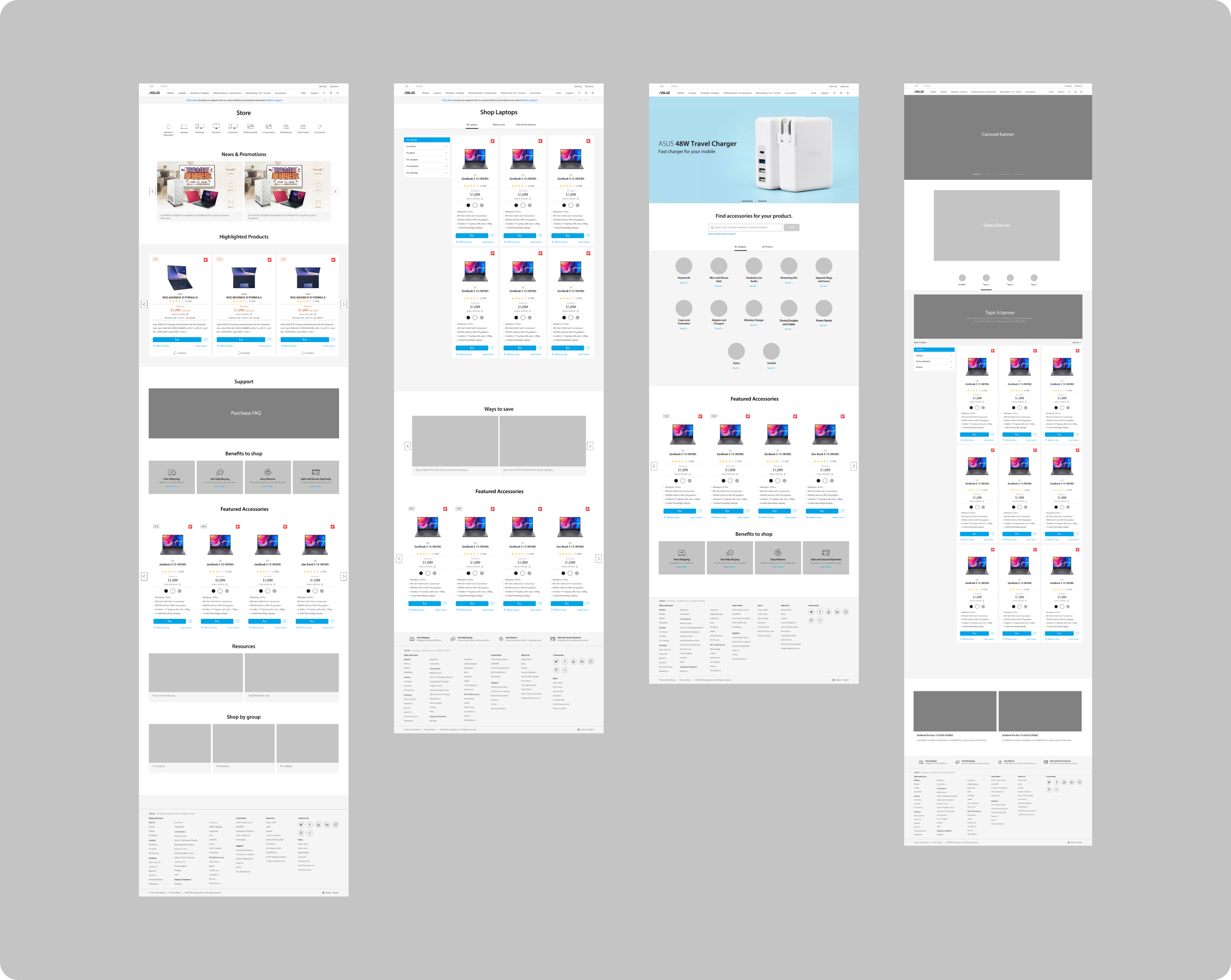
Final design
The purchase journey is definitely shorten into only 3 steps to add to cart! Most importantly, customers won't be confused of the availability of products; instead, products in "Store" are all available to be purchased online!
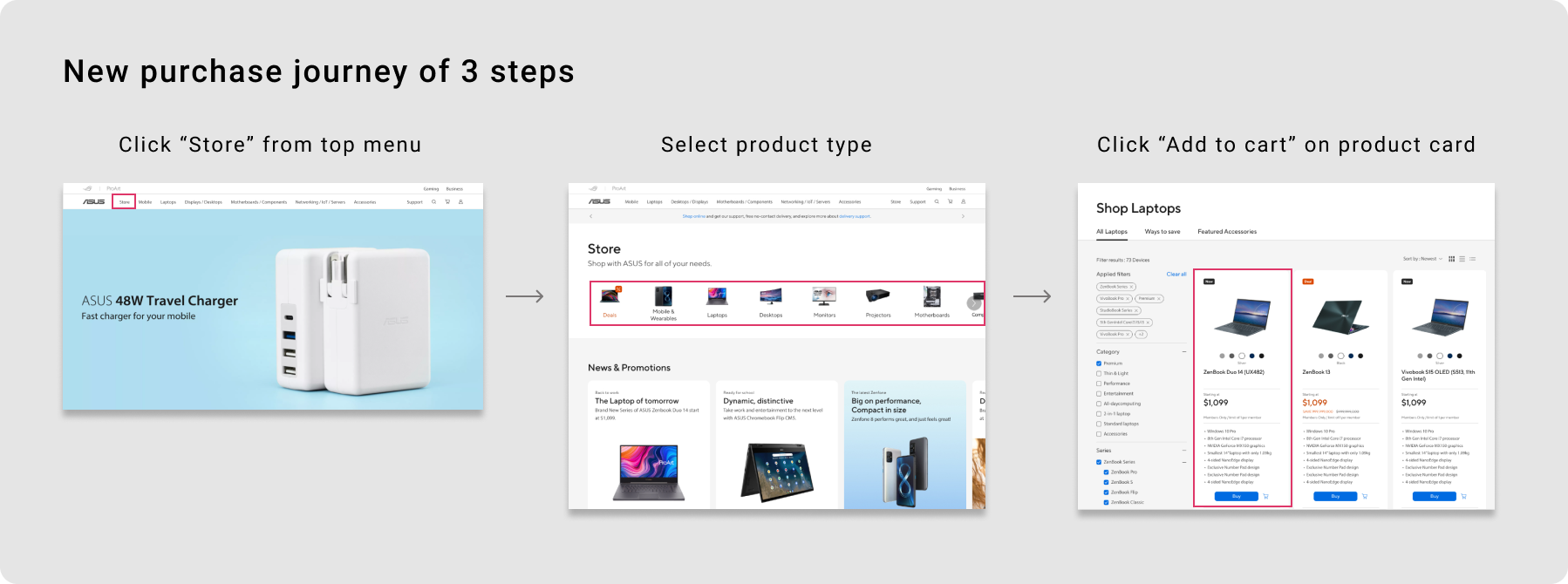
3 key design decisions
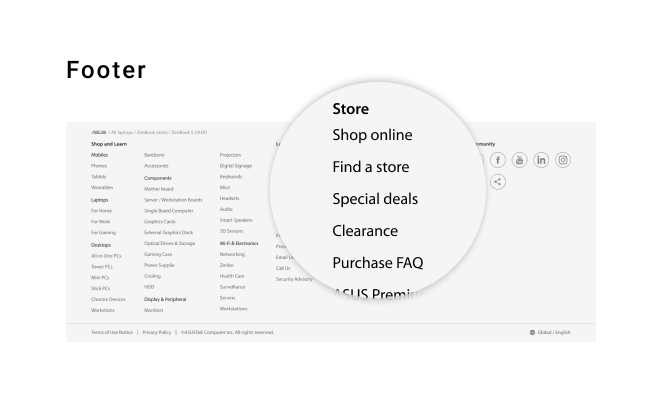
01 Access "Store" easily by providing multiple entrances
I provide the entrances directly from the top menu and footer. In so doing, users who intend to search for online shopping could enter the information more efficiently. The design B could make the access button easier to be seen.

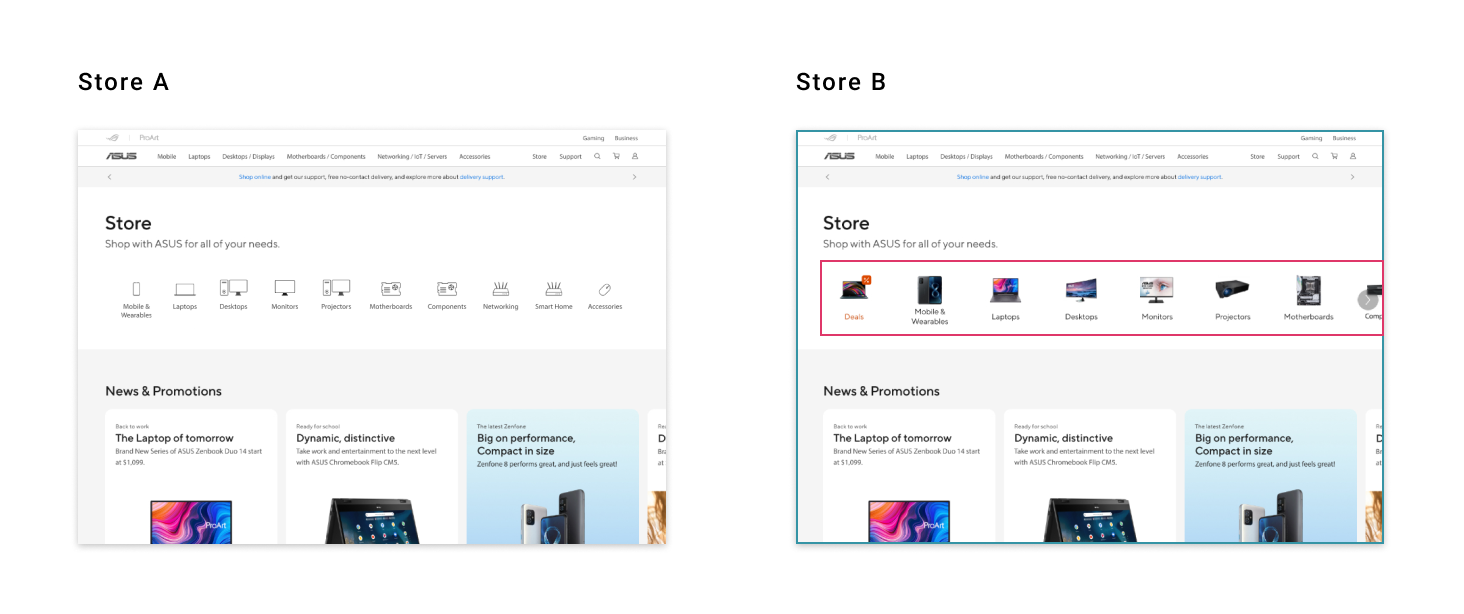
02 Shorten purchase journey by providing product line tab on store page, directing to a specific shop page
After clicking on a specific product type on Store page, it will direct to the shop page of that product type, displaying all sku-based and online available products with buy button provided. It's no need to select series or filter out the products in stock.
Regarding the product line tab style, although the white icons are more aesthetically pleasing form a design standpoint, we believe that the design B of color icons are more intuitive. On top of that, due to the fact that ASUS has multiple product lines, we arrange the most important ones in front, and design it as a slide row so user could scroll left to view more instead of occupying too much space.
03 Collect e-commerce related content together to improve efficiency
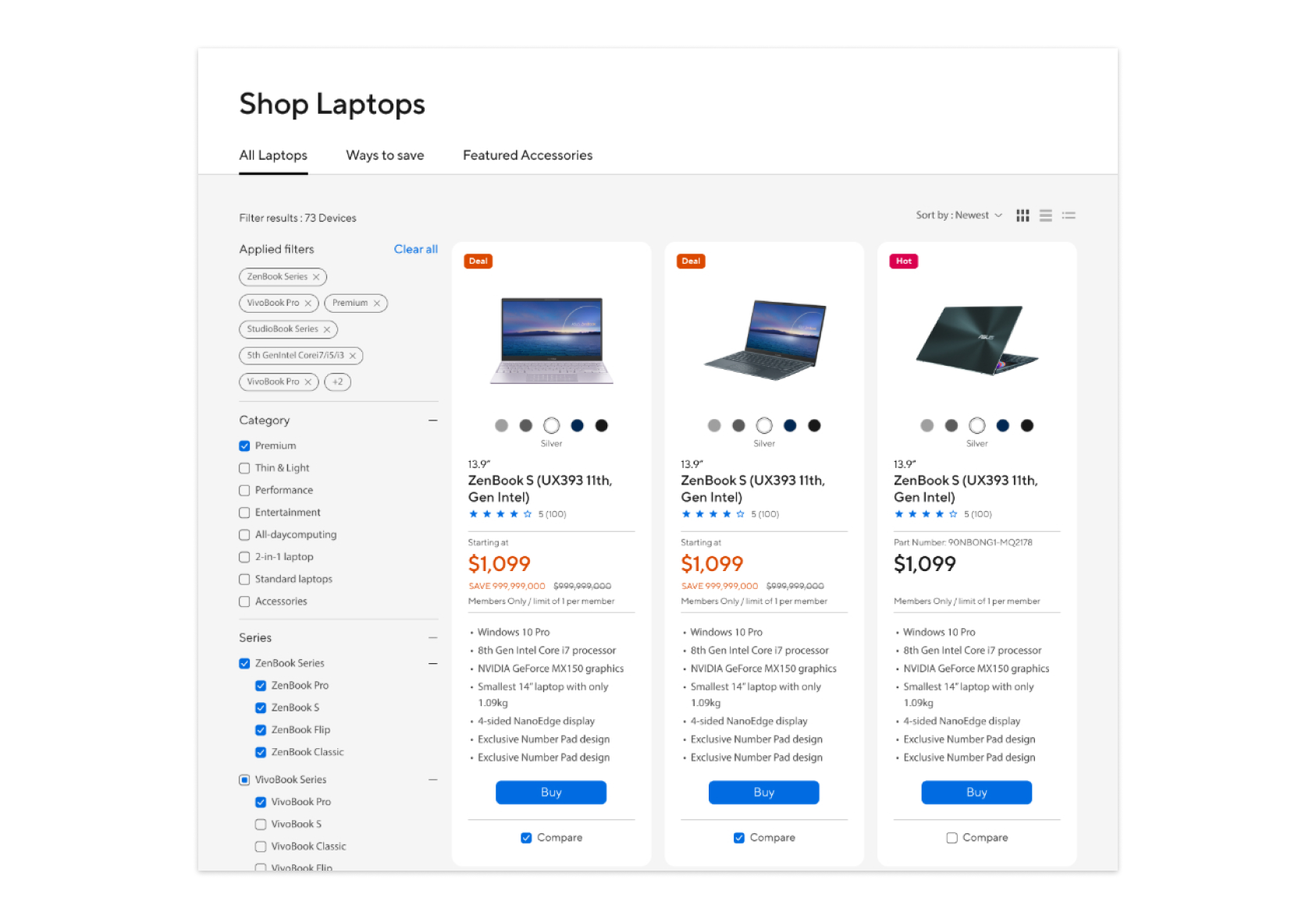
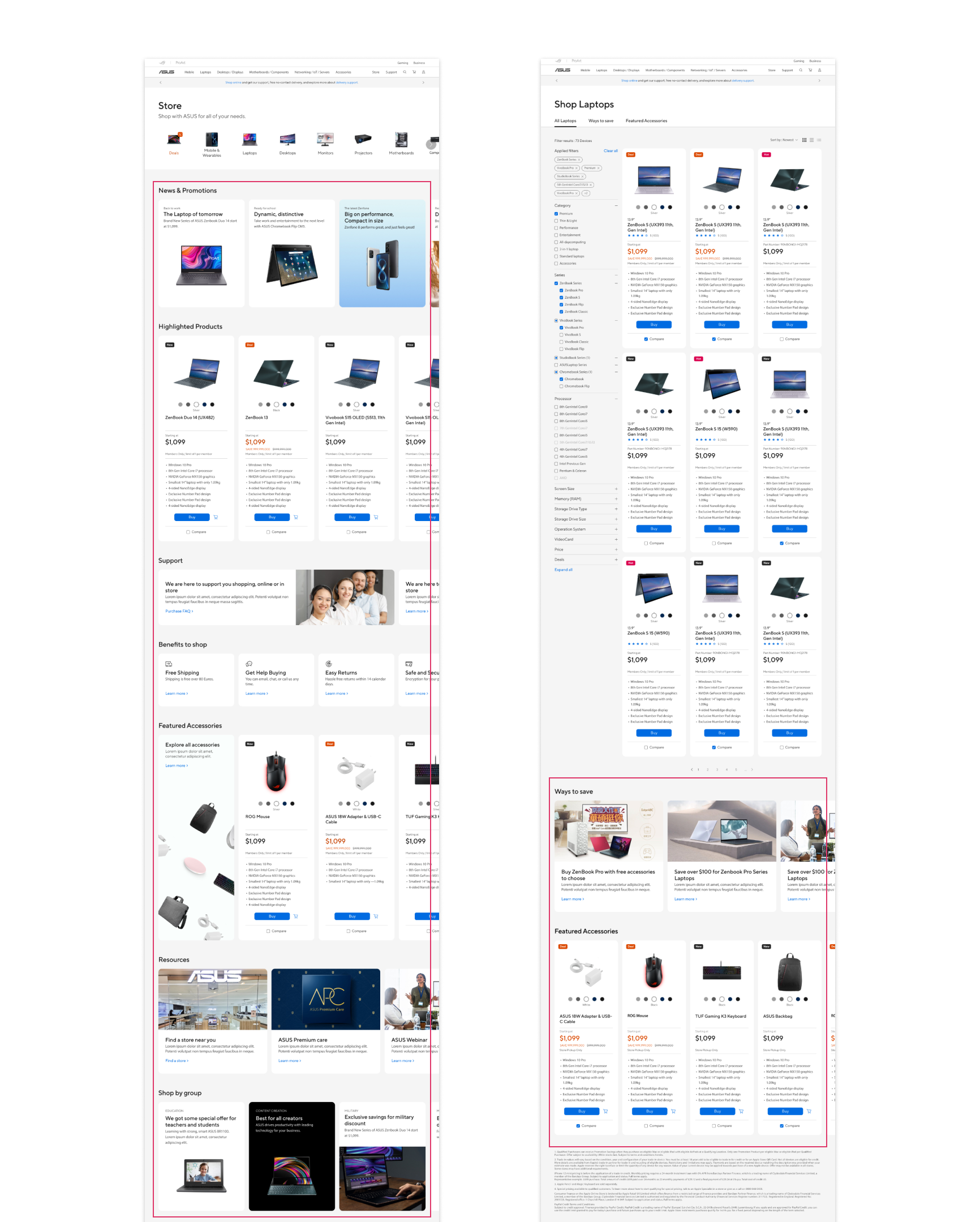
On store homepage, related page entrances are displayed at once, including product types, news & promotions, highlighted products, support, benefits to shop, etc. Also the content on shop page includes a filter to filter out products, ways to save, and featured accessories. In so doing, regarding any queries of one's order, deals and product support could all be found here, which indeed enhance the visibility.
03 Evaluation
Concept testing from business perspective
We conducted a meeting with over 100 locals from different countries to discuss our "Store" design proposal and reach the consensus. I was responsible for presenting the research results to back up for our design solutions. After collecting and reviewing all the feedbacks, we evaluated the feasibility and integrate it back into our design.
Feedback 1: Unnecessary steps to order products
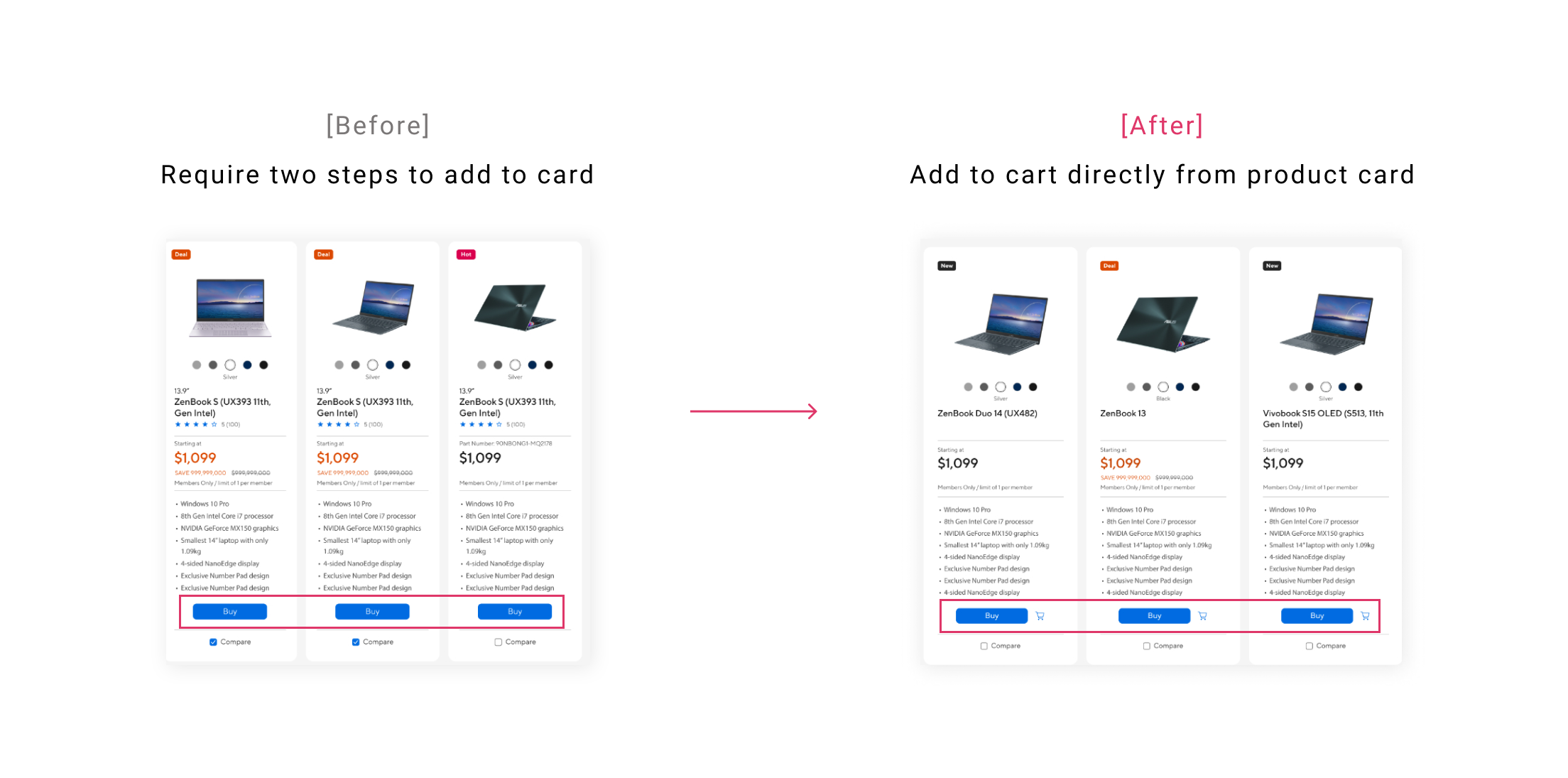
Iteration: Provide "Add to cart" button directly on product card
Provide an add to cart button instead of a buy button on the product cards could make sure every click users make takes them one step closer to converting. After studying UX guidelines and competitors, we decided to take the advice and also provide an add-on warranty page after clicking on "add to cart" based on the findings below:
- Put the “add to cart” button in the product list to shorten the purchase loop. Besides, if one is using discounts and offers a lot, and placing the "add to cart" button will raise conversion. Source: How to "Add to cart" properly
- Most competitors provide add-to-cart buttons directly, eg. HP, Lenovo, Dell, Acer.
Pressing cart button is the primary destination in the journey of searching for products, which could be set as the success metrics to identify if the design is convenient for users, and increase the possibility to add products in cart.
Feedback 2: Endless loading experience for mobile users
Iteration: Apply manual infinite scrolling button
In case that if too many product cards are listing on page without the control to stop loading them, it'll undoubtedly affect the scrolling experience, especially for India users who use mobile more often than PC. Therefore, I need to evaluate which design method is the best for us. There're three ways for scrolling:
1. Infinite Scrolling: display all product cards on one page, which is the way we use on our current site, eg. HP.
2. Manual infinite scrolling: display some product cards at first. After clicking "Load more" button, other product cards would be shown, eg. Lenovo.
3. Pagination: fixed numbers of product cards are listing on page, and a row of pagination is provided to switch to other pages, eg. Acer.
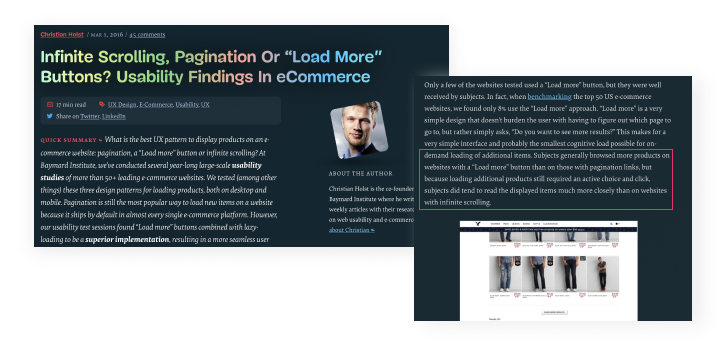
I've studied competitor analysis and looked up to UX research reports, and found out that these 3 scrolling methods should be implemented in different scenarios. We ended up choosing manual infinite scrolling, providing a "Show more" button at bottom, due to the fact that it's more suitable for sites which need users to browse more but also more interaction (eg. E-commerce).
For the final decision, I also considered with mobile viewpoint constraints; thus, for Mobile, it loads only 15 products at once, click on "Show more" for another 15 products.
Next step: review, review, and review
Since this project would impact the whole site structure and many other pages on consumer site, there're many details to go through to make sure every flow is logical and fluently. What's more, the design would be implemented in every local site, so we need to improve and review our design again and again in response to stakeholders' needs. Overall, stakeholders seem to be satisfied with this design proposal. (can't wait to launch!👏🏼)
Success metrics
Although I didn't participate in the release process, I suggested the success metrics based on Google Heart framework to evaluate if the design meet our business goals and user needs, comparing to former design.
1. To gather e-commerce related services together, make them easy to reach
-> Ease of use and low support contacts from satisfaction survey
-> Access and engagement rate of e-commerce resources (eg. register shop by group account)
2. To increase the visibility rate of products, motivate users to purchase more products
-> Completion rate of clicking on "add product to cart" button from store pages
-> Time spending on shop page for products viewing
Reflection on myself
It's the most challenging work for me during my working period in ASUS. Not only did I have to get ultimately familiar with Apple and HP site to transfer their design back to our own solution, but also presented all these insights in better understanding words to over 100 locals even from different countries. There're two tasks I've learned through this project:
Online survey
We put a few open questions in our survey. Although it did collect user thoughts in words but it's difficult to analyze thousands of answers in a short period of time. It's better to put close questions in a survey, or even utilize screenshot functions for user to circle the problem on the interface directly, like IBM or DHL.

Competitive analysis
At first, I only anaylzed what kinds of content Apple & HP display on their store homepage. However, to design a critical function in ASUS site, it's not only the homepage that matters, but also every interaction on the page. For instance, what's the user flow from the links on store homepage? What types of buttons are provided? What's the difference among different local sites? There're many insights that could be dig into, and I started to anaylze from the strategy perspective instead of just focusing on the design style.